What payments methods do you accept?
TeachMe.To accepts all major credit and debit cards, Google Pay, Link, CashApp, and TeachMe.To Gift Cards. Learn how each payment method works during checkout.
TeachMe.To supports a variety of fast and secure payment methods so you can book lessons easily and confidently. All payments are processed directly through our platform at checkout.
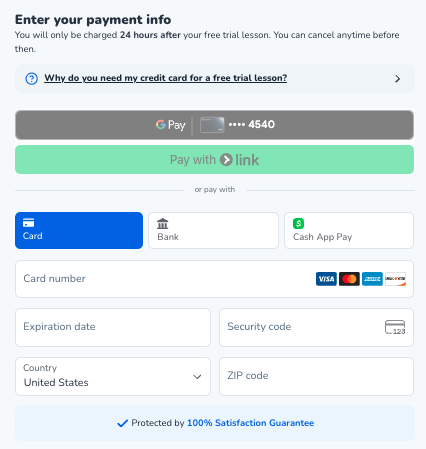
Below are the payment options currently accepted:
Major Credit and Debit Cards
You can pay using:
- Visa
- Mastercard
- American Express
- Discover
- Other major debit cards
Cards are the most common way Students pay for single lessons or multi-lesson packages.
Google Pay
If your device supports Google Pay, you can complete checkout with a single tap.
Benefits include:
- Fast, secure payments
- No need to manually enter card details
- Encrypted tokenization for added safety
Link
TeachMe.To also accepts Link, Stripe’s one-click checkout experience.
With Link, you can:
- Save payment details securely
- Check out quickly on any device
- Use the same stored information for future lessons
CashApp
TeachMe.To supports CashApp payments through compatible devices.
This is a convenient option if you regularly use CashApp for transactions.
TeachMe.To Gift Cards
If you’ve received a TeachMe.To Gift Card, you can redeem it during checkout.
Gift cards can be used toward:
- Private lessons
- Group lessons
- Single Lessons or Packages
Just enter your code at payment, and the balance will apply automatically.
Can I Pay in Cash?
No. TeachMe.To does not accept cash or offline payments.
For safety, security, and support purposes, all payments must be made through the app or website.
Having Trouble Completing a Payment?
If your payment is not going through:
- Check that your card details are up to date
- Make sure your bank isn’t blocking online transactions
- Try an alternative payment method (Google Pay, Link, CashApp, etc.)
How did we do?
Where is my receipt or payment history?
