How do payouts work?
Learn how TeachMe.To payouts work. Coaches request payment after each completed lesson through the Coach App using DOTS, our payout processor.
TeachMe.To makes payouts simple, fast, and secure. Students pay upfront when they book, and coaches request their payout after completing each lesson through the TeachMe.To Coach App.
Below is everything you need to know about when and how you get paid.
1. TeachMe.To Collects Payment Before the Lesson
Before you meet your Student, TeachMe.To collects the full lesson payment from them.
This protects coaches from no-shows and ensures you’re paid promptly after the session is completed.
You’ll never need to collect payments directly from Students.
2. Requesting Your Payout After a Lesson
Once the lesson is complete, you can request your payout in just a few taps.
Step-by-Step: How to Request Payment
- Open the TeachMe.To Coach App
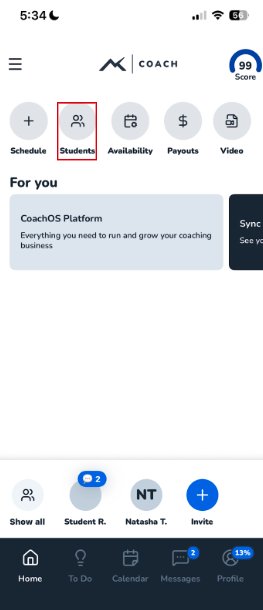
- On the homepage, tap Payouts
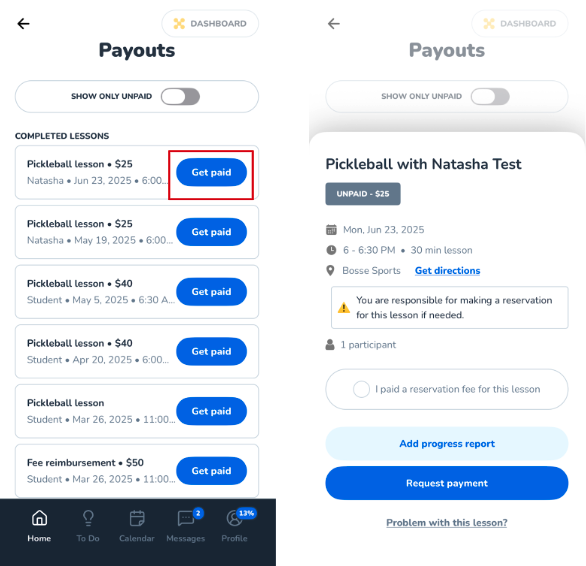
- Find the completed lesson and tap Get paid
- If you paid a venue or reservation fee, check the box “I paid a reservation fee for this lesson”If not, leave it blank
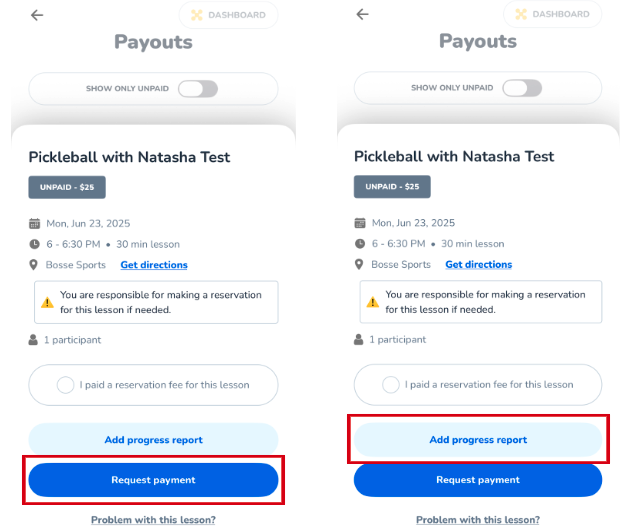
- Tap Request payment to submit
Your payout will then be processed through DOTS.
3. First-Time Coaches: Setting Up DOTS
For your first-ever payout, you’ll receive a text message from DOTS, TeachMe.To’s secure payment processor.
This text will guide you through:
- Adding your payout details
- Verifying your identity (standard compliance requirement)
- Setting up your bank account for deposits
Once this is completed, all future payouts will process smoothly.
4. Optional (but highly encouraged): Add a Progress Report
After tapping Get paid, you’ll see the option to add a lesson summary.
Adding a Progress Report allows you to:
- Give Students helpful notes
- Assign practice areas
- Improve retention and repeat bookings
- Build trust and professionalism
- Increase the likelihood of Students continuing weekly lessons
To add one:
- Tap Add progress report
- Complete the rating scales
- Write a short summary
- Add any recommended drills or practice areas
This step is optional but strongly recommended — coaches who provide progress reports often see higher rebooking rates.
5. How Long Do Payouts Take?
Once you mark a lesson as complete, you'll need to manually submit a payment request through the Coach App — payment requests are not sent automatically.
Once submitted, we process payments within 48 hours. Payouts come through Dots via Venmo, Cash App, PayPal, or ACH/Bank Transfer. Venmo is typically the fastest option, usually settling in 15–20 minutes, while Cash App and PayPal may take slightly longer, and ACH/Bank Transfers take 3–5 banking days to settle. If you're looking for the quickest payout, we recommend selecting Venmo.
Payout timing may vary depending on:
- Bank processing times
- First-time DOTS setup
- Weekends or holidays
6. Tracking Your Payouts
All requested payouts appear in the Payouts section of the Coach App.
You can track:
- Pending payouts
- Completed payouts
- Adjustments for reservation fees
This keeps everything organized and transparent.
How did we do?
What is the payout schedule?
