Where can I find tax documents?
Learn where to access your TeachMe.To tax documents. If eligible, DOTS—our payout processor—provides forms like the 1099-K through your payout dashboard.
TeachMe.To partners with DOTS, our secure payout processor, to handle tax reporting for coaches. If you meet the earnings threshold required in your region—such as the U.S. 1099-K requirement—your tax forms will be issued through DOTS at the end of the fiscal year.
Here’s where to find them and how to access your documents.
Who Receives Tax Documents?
DOTS will issue a 1099-K if both of the following are true:
- You earned over $600 in total payments for the year (U.S. threshold)
- Your payout region requires form issuance through a payment platform
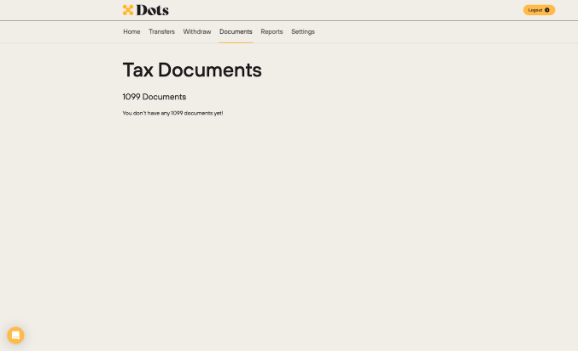
If you do not meet the threshold, you will not receive a tax form, and the Documents tab will remain empty.
How to Access Your Tax Documents
You can download your tax forms in two ways:
Option 1: Access Through the DOTS Website
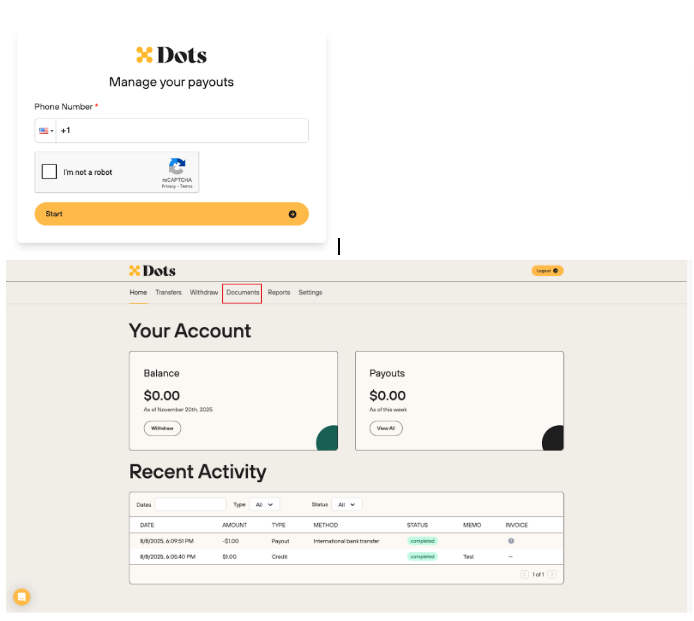
- Go to https://my.dots.dev/login
- Enter the phone number associated with your TeachMe.To coach account
- Once logged in, tap Documents
- If eligible, your 1099-K or other required forms will appear here
Option 2: Access Through the TeachMe.To Coach App
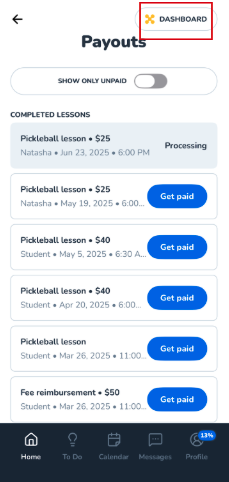
- Open the Coach App
- Tap Payouts on the homepage
- Tap Dashboard
- Enter your phone number to log into DOTS
- Navigate to the Documents section
Your available tax forms will be listed there.
When Will My 1099-K Be Available?
Tax forms are typically generated at the end of the fiscal year and appear in your DOTS dashboard once ready.
If you qualify, expect the form to show up in the Documents tab when DOTS completes annual reporting.
On Dots App/Site:
On TeachMe.To App:
How did we do?
What is the payout schedule?
